Showing posts with label iOS. Show all posts

Saturday, January 18, 2014

JW's Favorite iPhone & iPad Apps Of 2013


For the sixth consecutive year, I’ve compiled a list of the iOS apps that I’m using the most across my iPhone & iPad. In 2013, I mostly used a 3rd generation iPad and iPhone 5, but upgraded to an iPhone 5S in the fall and continued to use my iPhone 4S for shooting video and docking in my car to use the BMW Connected app.

When I think about 2013, it was really characterized by the proliferation of app-enhanced hardware. Some people call the combo "packs". These connected devices, whether wearable tech or smart home tech, illustrated the continued maturation of iOS as a platform. I’ll talk about some of those apps working in tandem with devices below.

2013 also saw the arrival of iOS 7, unquestionably the most radical change to the OS since its introduction in 2007. The impact this had across the 3rd party developer landscape can’t be overstated. The retooling of apps to adopt the new design language was so non-trivial, that some developers chose to release new versions of their apps not as updates but entirely new apps. Two of my most used apps from 2012, Tweetbot & Reeder, took the path of releasing as entirely new apps given the radical iOS 7 optimization work.

Now read on for the breakdown of how I got things done on mobile in 2013.

iPhone Apps

Most Used Apps

Google Voice

I’m leading with this one because I have a feeling it won’t make the 2014 list. I’ve used Google Voice since 2009, but the product seems to be languishing with only a single minor app update in 2013. Google seems to be pouring more effort into their Hangouts app, but currently there’s no direct tie into the Voice service on iOS. Further diminishing my enthusiasm for the Google Voice app is the increasing role of OS-level hooks for things like Siri texting or dialing. Unless Google Voice gets some attention in early 2014, I’ll likely port my number out to Verizon. But in 2013, Google Voice was how I did all my texting & outbound calling on my iPhone.

Facebook

The Facebook app got updated no fewer than 20 times in 2013, and each release showed continued improvement. It’s gotten so good, that I’m rarely interacting with Facebook on my MacBook Pro anymore. Occasional quirks still appear (like some posts missing in the iOS app that are still viewable on the desktop), but for most of my Facebook needs, the app fits the bill.

Evernote

I’ve bought into the Evernote system. I’m using their Moleskine notebooks, scanning all my mail & other documents into it via a ScanSnap, and taking the dozens of whiteboard photos for archival into Evernote. Having all of that data searchable and instantly accessible wherever I am is beyond awesome. The iOS 7 refresh of the app is gorgeous, too.

Instagram

Although video capture was added here in 2013, I still find myself using Instagram mostly as a daily photo journaling tool. I keep the app on my main home screen to remind me to look for photo opportunities throughout the day.

Timehop

My own personal time machine. I check this app every morning to see my digital snippets from that date in previous years that I’ve captured on Twitter, Foursquare & Instagram. It’s entertaining seeing trends, especially around holidays.

Couple

This app was previously branded Pair and mentioned in my 2012 roundup. Couple is the messaging app my wife & I use for daily communication with each other. Sticker packs were added this year, too, and my wife seems to be rather fond of the Pug ones. A little more intimate than just using the stock Messages app or Google Voice for general purpose messaging.

Withings Health Mate

I really ramped up my interest in the quantified self movement this year, and this app is kind of the hub of that activity. In April, I ordered one of the Withings Smart Body Analyzers, picked up the Withings Blood Pressure Monitor in May, and finally added the Withings Pulse activity tracker in June. All of the data provided by these 3 devices is collected and displayed within the Health Mate app so I can track progress over time.

iPhone Apps I Began Using More Frequently In 2013

Dropbox

After becoming a paid subscriber in 2012, I effectively centralized all of my non-music files on Dropbox in 2013. Since all my iPhone photos auto-upload to Dropbox, it’s more convenient just having all of my photos, documents, and other files all accessible via Dropbox than having to log into my PC back at the house via something like LogMeIn.

Google Maps

Although I have a navigation system built into my car, sometimes it’s just quicker to search for something via the Google Maps app and drive away with my iPhone sitting on the dashboard providing navigation instead of finding the exact address and plugging that into my car’s system. Especially if I’m making short trips within the city, I find myself just defaulting to my phone more and more. For longer road trips, though, I still prefer using my car’s built-in navigation.

1Password

I’d been a longtime Splash ID user dating back to my Palm Pilot days in the late 90s, but in February 2013 I decided to switch over to 1Password for my password management needs when the software went on sale. The integration across iOS & OS X at a more seamless level is what swayed me, and I must say it’s been a definite improvement. I’ve finally improved on diversifying my passwords as a result, and given all of the data breaches we saw in 2013, I’m really glad I did.

Flickr

After its drastic 2.0 redesign in late 2012, this app gained another feature in 2013 that really increased my usage: auto-upload of the iPhone’s photos in full resolution. Although Dropbox is still providing a safety backup for my photos, Flickr is ultimately where all of my photos end up, so having them automatically uploaded from my iPhone is saving me a step.

Netflix

After picking up a Chromecast dongle earlier this summer, my usage of the Netflix iPhone app skyrocketed. Why? I attached the Chromecast to a small TV my brother gave me when he moved, setup that TV near my twins’ play area in our living room, and now constantly have cartoons playing on that 2nd TV when we’re watching something else on our main TV. As soon as one cartoon finishes, I queue up another one via the Netflix iPhone app, and the girls’ have their own programming available.

Dropcam

I bought my first Dropcam in early 2012 as a baby monitor for our twins’ nursery. On Memorial Day weekend 2013, my house got shot at (yes, in The Woodlands), and I kind of went into papa bear mode in securing the Casa De Western 4.0. I bought a Glock and a semi-automatic shotgun. I installed enough exterior LED lighting to rival airports. And I went crazy adding more Dropcams onto my home network. How crazy? Enough to merit adding another AirPort Extreme Base Station to my home network to help load-balance the influx of 24/7 video recording. I use the Dropcam app to view all of those video feeds at a glance or drill back into past footage to see what activity there’s been around my house. It also makes for some fun clips like this: https://twitter.com/JustonWestern/status/402645347115474944

Runkeeper

In large part because of its integration with the Withings Health Mate app and the Pebble watch, I’ve started using Runkeeper to track all of my runs and dog walks. Although I still keep all of my activity tracked within the Nike+ world via the FuelBand app, the 3rd party support of Runkeeper makes it a valuable piece of my overall logging system.

Nest Mobile

I received a pair of Nest Thermostats for our house as a birthday gift in 2013, and have since been more excited with thermostats than I ever thought I’d be. Using the iPhone app, I’ve been much more in tune with the house’s energy usage, and particularly enjoy turning on either the AC or heat a few hours before arriving home from a road trip so we arrive home to a comfortable house.

Favorite New iPhone Apps of 2013

Pebble

I backed the Pebble smart watch on Kickstarter during its 2012 campaign, and finally received my unit in February 2013. While it’s still not what I’d deem a mass market product, I’ve really enjoyed tinkering with mine, and have particularly enjoyed it the 2nd half of the year. Once iOS 7’s Apple Notification Center Service was implemented within the Pebble app, it increased the reliability of getting notifications from your phone to your watch significantly. I now wear mine all the time, and really love the Runkeeper app that runs on it that gives me time/distance/pace info on my wrist during my runs and walks. The Pebble app itself is kind of the conduit that facilitates that interaction between the iPhone and the Pebble watch.

Vine

Released early in 2013, Vine did to videos for me what Instagram did for photos. I’ve found myself looking for more opportunities to shoot those 6 second video clips that loop endlessly. You can see the nearly 100 clips I shot in 2013 here: https://vine.co/juston

Tweetbot 3

Although Tweetbot has been on my list for several years, this year saw the release of an entirely new app that leverages the new iOS 7 design language. Tweetbot is the gold standard by which all other social media apps are measured, and Tweetbot 3 reconfirmed that. This app is particularly useful if you have multiple Twitter accounts.

Reeder 2

Another app which chose the new app path for their iOS 7 redesign, Reeder 2 is the long-standing favorite iOS RSS client. Even with the shutdown of Google Reader earlier this year, I found refuge in a service called Feedbin that Reeder supported as an RSS backend. The resulting experience transitioning from Google Reader to Feedbin was painless, and Reeder 2 made the whole experience feel right at home on iOS 7.

ESPN SportsCenter

The Push Notifications from this app are what makes it great, and the development team seemed to recognize that, making per game notifications even easier to quickly set in the app’s major 4.0 release that arrived in late November. Since ESPN is the 800 pound gorilla in sports programming, you’re almost always assured of finding any relevant highlights available within the app, too.

Automatic

This app pairs with a Bluetooth dongle that plugs into the OBD port of your car. Then all of your driving activity is tracked in a way that suggests improvements in your driving style to optimize fuel efficiency and safety. It’s also kind of interesting to have something of a driving journal so you can see trends over time with commute times.

IFTTT

I’ve long been a fan of If This Then That (aka IFTTT), and the arrival of their iOS app this year just made me love the service more. Using a Trigger & Recipe model, this app allows me to link together different web-based services to automate various portions of my life. For some of the recipes I’ve created, check out my shared ones here: https://ifttt.com/p/juston

iPad Apps

Gmail

When I’m working with email on my iPad, I’m usually looking to do a bit more than just read messages like I do on my iPhone with the native Mail app. I heavily use labels in Gmail, so if I’m looking to label & archive messages as I triage my Inbox, this has proven to be the most effective iPad mail client for me.

TiVo

We’ve been a TiVo household since 2005, and the past two years have been fantastic when it comes to integration with iOS devices. When we’re traveling, we download shows locally from the TiVo Roamio Pro to the iPad and then watch on the road. In 2013, the iPad app also gained the ability to stream live TV, which I used most often to watch NFL games while we were traveling that weren’t available in the NFL Sunday Ticket app. I also downloaded the full Iron Bowl broadcast to watch on our drive back to Houston from Auburn. War Damn Eagle.

WatchESPN

This is perhaps my most used iPad app, especially during college football season. Since the Southeastern Conference has a contract with ESPN (and will be launching the SEC Network this August), my wife & I were almost always assured to have either the LSU or Auburn games available on the iPad via the WatchESPN app if we had the other game on the TV in our living room.

Tweetbot

In my opinion, this is still the killer app for a second screen experience. When we’re watching a game or some other live event on TV where there’s a high likelihood that people will be tweeting about it, I just set the iPad beside me on the couch with this app running to watch the backchannel conversation roll in. Sadly the iPad version of Tweetbot didn’t see an iOS 7 refresh in 2013, but hopefully that arrives early in 2014.

Kindle

Probably my second most used app on the iPad, Kindle quenches my thirst for long-form reading. I blew through 10 books in the Kindle app in 2013, and am targeting at least that many in 2014. While I will occasionally read some chapters of books via the Kindle iPhone app, the iPad incarnation is still my favorite.

Reeder 2

While this app sees much less of my eyeballs than the iPhone version of Reeder 2, if I’m looking for a quick fix of RSS feeds before bed, I regularly spend about half an hour reading through articles in this app. Reeder 2 is a universal app, unlike its predecessor which required different purchases for the iPhone & iPad versions.

NFL Sunday Ticket

Hands down the most expensive app in my library, on account of the required subscription at a rate of $300 each year. But as a New Orleans Saints fan living in Houston, this app (reasonably) assures me that I’ll get to watch every Saints game each season. As I mentioned last year, yes, this is insanely expensive, but it’s still cheaper than going to a sports bar each Sunday.

Tweet Library

I discovered this app early in 2013 and it’s changed the way I dig through my 6,500 tweets from the past 7 years. Tweet Library allows you to import your Twitter archive of tweets (which you request from your Settings page on Twitter.com), and then makes that entire catalogue of tweets searchable to you. Tweet Library is also a full fledged Twitter client, but it’s the import/search functionality that makes it truly stand out.


Tuesday, June 11, 2013

If I Want To Build An iPhone App & Android App, Will It Cost Twice As Much?


(Cross-posted from the ChaiONE Blog)

Here at ChaiONE, we're often approached by individuals & companies looking for guidance on their mobile initiatives. One issue that frequently surfaces concerns addressing a user base that may consist of a mixture of iOS & Android users. This is common when the software will be consumer-facing where Android has a large market share, or in BYOD (bring your own device) scenarios where a company won't be issuing a standard device across its workforce.

In cases where the user base platform landscape will be heterogeneous, many organizations consider building a cross-platform app using technologies such as HTML5 or Titanium. Depending on the type of app desired, this may be an economic option. For simpler apps where access to the device's more advanced capabilities aren't needed, a cross-platform app can sometimes get your software into the hands of users for less upfront development cash outlay.

While ChaiONE's Director of Development, Ben Scheirman, will discuss in detail in an upcoming blog post about the many advantages of developing native apps instead of cross-platform apps, for the remainder of this article let us just assume that there are indeed compelling reasons to build individual native apps for each platform instead of a write-once, deploy everywhere approach. If you're considering building a native app for iOS, and a native version for Android, will this cost you twice as much? The short answer is no. Let me explain why.

During the course of an app development project, there are several types of activities that must occur. Usually a period of user research will precede all other activities to ensure the yet-to-be-built app will in fact meet the needs or fulfill the desires of the individuals who will actually be using the software. Once that is validated, an app development team will then begin designing the app, both in the context of user experience paired with visual design and foundational technical architecture. Notice that I haven't mentioned anything specific to iOS development or Android development yet. This is important.

Apps rarely exist in isolation. By that I mean most modern mobile software isn't self-contained. Instead, it's more common that an app will frequently communicate with the outside world, pulling in new data from different sources or pushing out data created in the app to other servers. This communication with the outside world is accomplished via Application Programming Interfaces, or APIs. While the concept of APIs are beyond the scope of this article, at a high-level it's a structured way for two software entities to consume & transmit data between each other. If the APIs your app will utilize already exist, the app development team will just need to document the structure and plan to build the app in such a way that can interact with them. If the APIs your app needs don't currently exist, then the development team will need to define and subsequently build them so the app can eventually utilize them.

All of the activities I have outlined so far are mostly platform agnostic. Regardless of the platform you target, these efforts would need take place. These efforts are also foundational, meaning they need to take place before the team begins development on the app itself in earnest. Depending on the nature of the app, these efforts can often be time-consuming, especially when you'll be creating your own APIs. However, once these activities are complete, the outcomes can be leveraged across multiple platforms in a near-trivial manner.

Let's say it took somewhere between 25% & 50% of an overall single-platform project budget to accomplish the tasks described above. If you opted to build an iOS app first, you wouldn't have to allocate the same amount of time if you then decided to build an Android app, too. You can make whatever minor adjustments from a design perspective that are necessary for the new platform, but you don't have to rethink the overall structure or technical foundations that you've previously defined. And that's why it won't cost you twice as much to build for two platforms.

As a final consideration, I'd like to highlight one approach that I've observed to work well. If you do opt to natively develop for two or more platforms, consider staggering the development efforts. For instance, let the Android development efforts lag a few weeks behind the features being developed in the iOS app, or vice versa. The advantage of this approach is that it allows new problems or challenges to be solved on one platform before they're encountered on the others. This way, if business logic or other considerations must be unclogged, you're not delaying progress on multiple platforms at the same time.

Wednesday, January 02, 2013

JW's Favorite iPhone & iPad Apps Of 2012


Not since the original iPhone release in 2007 or the original iPad release in 2010 has the software landscape for iOS been so directly impacted by new hardware as it was in 2012.  With the new iPad gaining a Retina display in March, the iPhone 5 getting a taller screen in September, and the iPad mini showing a new iOS device form factor in November, iOS developers had an increasingly diverse suite of screen resolutions and design considerations to address.

As an app consumer (especially if you were an early adopter of those new devices), the impact of the steady march forward in hardware was jarring at times.  If your favorite iPad apps weren't Retina-optimized, they sometimes looked terrible.  If your favorite iPhone apps weren't optimized for the taller iPhone 5 display, you needed to adjust to having black bars letter-boxing your app at the top & bottom of the screen.

Despite these relatively minor nuisances, 2012 was also an absolutely fascinating time to follow the evolution of app design & development.  While I'm fortunate enough to be involved in this space as part of my day job at ChaiONE, I also continue to be legitimately passionate about this stuff and spend much of my free time trying out new apps on my own devices or running initiatives like the Houston App Aficionados.

As I've done the past four years (2008, 2009, 2010, 2011), I've taken stock of the apps I'm regularly using across my iPhone & iPad, and written a quick blurb about each of them below.  I'm hopeful you'll find some on this list that you can use to make your days better in 2013.

iPhone Apps

Most Used iPhone Apps

Tweetbot
This third-party Twitter client from Tapbots is still how most of my social network status updates originate (with syndication to Facebook via the Twitter app now that Ifttt can no longer use Twitter triggers).  With multiple account support, it's the one client I use on my iPhone across 5 Twitter accounts.

Foursquare
The granddaddy of checkin apps, I use this as my personal passport, checking into each venue I enter every day.  With nearly 4 years worth of my checkin data in this app, it's fascinating to see the stats on elapsed time between visits.

Reeder
If you want an efficient means of consuming website articles, this Google Reader client is still best in class.  This single app accounts for the majority of app use on my iPhone.

Evernote
Particularly since the UI-overhauled 5.0 release of this app in November, I find myself creating more notes via the iPhone app, as opposed to the Mac app.  This is especially true for capturing photographs of notes/drawings on whiteboards around the office and at home.

Instagram
Despite the Facebook acquisition of Instagram in April, and its Terms of Service PR firestorm in December, the app & its highly-engaged community still set the standard for mobile-first photo sharing.  While I cross-post all my Instagram shots to Flickr & Blogger, I still originate the majority of my photos in Instagram.

iPhone Apps I Began Using More Frequently In 2012

Gmail
Google's iOS team was prolific in 2012, overhauling some of their existing iPhone apps, and releasing several completely new ones.  One to see a significant improvement towards the end of the year was version 2.0 of Gmail, with multiple account support & a crisp white user interface that made email on the iPhone fresh again. If you're a heavy user of labels in Gmail, this app is a must-have.

Google Voice
Despite the proliferation of the iMessage protocol to OS X in Mountain Lion, and continued feature enhancements in iOS 6, I still conduct the majority of my text-based communications through the Google Voice iPhone app.  When I'm at my computer, I'll compose & respond via the Chrome Google Voice extension, but when I'm away from my desk, this app is still my go to solution.

Flickr
With the executive shakeup at Yahoo earlier this year, there seems to be a revived interest in their Flickr product.  The iPhone app benefitted from that renewed attention, with a redesign that finally looks and behaves like a mobile photo social network. Today I'm mostly using it to view photos instead of photo capture, but that may change in 2013 if Instagram clutters up their app interface.

Dropbox
After lightly using the service for the past several years, I finally became a paying Pro subscriber in 2012, driven in large part by the Camera Upload functionality added to their iPhone app.  Having become a new father in March, I wanted to ensure I never had to worry about losing photos or videos I shot of my twins on my iPhone, so the Dropbox app has become a critical piece of my daily data backup scheme.

Facebook
The Facebook iPhone app had been limping along for years until its 5.0 release in August.  Now with a native implementation of several features that were previously built using HTML5, getting your Newsfeed & Timeline to load within the iPhone app is significantly faster & less frustrating.

Amazon
Our household became Amazon Prime members in January in preparation for getting regular shipments of baby items like diapers & formula.  Now we order everything from scissors to plungers through the site thanks to its free two day shipping, and I normally reach for my iPhone to add things to our cart via the Amazon app.  It's not as robust for browsing Amazon.com as using a web browser on your laptop, but for quickly searching & buying items, it serves the purpose quite well.

Slice
Since during any given week we have several Amazon orders headed our way thanks to that Prime subscription, this app has become indispensable for quickly knowing what is going to arrive and when.  Getting Push Notifications when your package is out for delivery and then when it's actually delivered saves me the time & effort of logging into the UPS or FedEx sites to track shipment progress.

Favorite New iPhone Apps of 2012

Timehop
Remember the 4 years worth of Foursquare checkin data I mentioned earlier?  Well Timehop helps me resurface it, every single day.  By connecting your Foursquare, Facebook, Twitter, & Instagram accounts to Timehop, the app will send you a Push Notification each morning letting you know your personal history for that day has been assembled. You'll see what updates you posted to those various social networks last year, 2 years ago, all the way back to 2004 if you were using Facebook back then.

Letterpress
Developed by Loren Brichter, who invented the 'pull to refresh' functionality now leveraged across countless iOS apps, this casual word game is like a more entertaining Words With Friends or Scrabble.  Whereas Words With Friends just became tedious after a few rounds, Letterpress has become a fun attention diversion that I'm still enjoying daily even after several months of play.

Pair
This app is an iOS-only social network between you and your significant other.  My wife & I use it to send messages, photos, and videos back and forth to each other throughout the day.  We could accomplish the same thing via traditional text messages, but this app feels more intimate and has some cute couples-centric features that make it enjoyable to incorporate into our daily routines.

Netbot
Netbot is effectively a clone of Tweetbot, but targeted at the ad-free, paid App.net social network instead of Twitter.  I signed up for a year subscription to App.net after Netbot was released in October, and it's been a fun community of mostly geeks reminiscent of Twitter circa 2007.

WithBaby
After our twins arrived in March, I wanted to outfit their nursery with a video baby monitor.  I settled on two, with the Withings Smart Baby Monitor being particularly well-suited to our needs because of the baby-centric nature versus a standard web cam.  WithBaby is the iPhone app companion and allows my wife & I to see the girls when we're at work, turn on lullabies, monitor the temperature & humidity in the nursery, and even talk to the twins via the built-in speaker of the baby monitor.

Dropcam
This was the second video baby monitor I chose.  While not marketed solely as a baby monitor, Dropcam was attractive because it provided an online DVR feature that let me rewind to any motion or sound events that took place in the nursery.  Aside from iPhone & iPad apps, I can also access my video footage via a web browser when I'm at my desk.

Frameographer
This app was developed by the creators of the Glif iPhone tripod mount accessory.  It allows you to create stop-motion & time-lapse videos.  I've used it to create some interesting videos, such as this one of my daughters swinging in baby seats and this one of clouds billowing over Houston on Halloween.

Nike+ FuelBand
A recent addition to my fitness app arsenal, I'm looking to leverage this app + wristband combo meaningfully in 2013 as a way to stay motivated to hit my fitness & weight loss goals.  By earning Nike Fuel points each day and competing against your Facebook friends, the idea is that you'll move more.  My wife says it makes me a little more like a robot.  I think I'm OK with that.

Google Maps
Even if you don't follow mobile technology closely, you likely heard about this app due to the high-profile negative PR surrounding Apple's Maps in iOS 6.  In short, Google Maps is worthy of the hype.  The data is accurate, the UI is crisp, the turn by turn voice directions are well executed, and the app pulls in search history of location queries you've done on your computer.  It's awesome.

Google Drive
Google Docs was rebranded as Google Drive this year.  I have nearly 8 years of documents & spreadsheets within the Google Drive system, so having a way to natively access and edit my files on my iPhone has been a tremendous addition to my productivity toolkit.

iPad Apps

SoundCloud
When Megaupload was shut down in January, it had a chilling effect on the availability of podcasts and live mix set recordings from DJs around the world.  I speculated at that time that we'd see a consolidation of mixes to the SoundCloud platform as a result, and the rest of 2012 seemed to support that hypothesis.  Soundcloud's iPad app is excellent, and if you follow the right artists on the site, it becomes a reasonable alternative to services like Spotify or Rdio for electronic music fans.

Sunday Ticket
In NFL seasons past, if we didn't get the Saints game on our Comcast cable package here in Houston, we'd just go to one of the local sports bars to watch the game. Since having two infants complicated that approach, this season we subscribed to the online-only package of Direct TV's NFL Sunday Ticket.  The Sunday Ticket iPad app allowed us to watch the Saints games at home on the couch with the girls, while we had the Texans game on the big screen.

WatchESPN
When ESPN & Comcast reached a content agreement in May of 2012 to allow Comcast customers access to the WatchESPN app, I knew football season was going to be awesome.  I was right.  Every Saturday during the fall, we'd have a football game on our TV, and then two other games pulled up in the WatchESPN apps on our iPads. It was like our living room was a more comfortable Buffalo Wild Wings.  Perfect.

TiVo
We added a TiVo Premiere XL4 & TiVo Stream box to our home theater setup in 2012, which meant the TiVo iPad app became significantly more feature packed.  The app allows us to stream shows wirelessly over our home network to the iPad while something else is being watched on TV.  Or we can download previously recorded shows to the iPad app to take with us while we're traveling.  It also allows us to schedule recordings or browse the program guide on the iPad instead of interrupting viewing on the TV.

Chrome
While I still mostly use Safari on my iPhone for web browsing, I've found myself using the Chrome browser on my iPad more each month since it was released during the summer.  As someone who spends his days working in the Chrome browser on the Mac, the familiarity of Chrome on the iPad feels nice when I'm casually web browsing at night.

Tweetbot
This is my most used iPad app.  When we're watching television in the evenings, I'll leave my iPad next to me on the couch with Tweetbot open and watch as the stream of updates roll in.  This is particularly compelling during live sporting events, or other live events like elections and news broadcasts.  This is the best second-screen experience app I've come across.

GV Mobile +
Since Google still hasn't developed an iPad-optimzed Google Voice app, I use GV Mobile + for responding to text messages when I have my iPad next to me, but my iPhone is on the charger.  It was developed by Sean Kovacs, who really drove the movement for Google Voice on the iPhone in 2009 & 2010 before Google ever released their own first-party solution.

iControlAV
This app is for the Pioneer VSX-1122 AV receiver we added to our home theater this summer.  It allows me to change source inputs, volume, zone outputs, and basically all other functionality that you'd normally need to use the IR remote to execute, but over Wi-Fi via the app.  That means I can change audio sources on my backyard patio while smoking a cigar without ever impacting the show or volume my family is watching in the living room.

Scanner Pro
Since the third-generation iPad added a respectable camera to the device, apps like Scanner Pro can leverage photo-capture capabilities to accomplish tasks like scanning in documents.  While you won't mistake the resulting PDF for something produced by a quality hardware scanner like a Fujitsu ScanSnap, it's very convenient to be able to scan in documents on the spot when at a client site with only your iPad, instead of waiting to get back to a dedicated scanner to digitize a few pieces of paper.

CNN
With the ability to stream the live TV broadcast of CNN through the iPad app, I've found myself setting up the iPad on my desk at work whenever there's a breaking news story.  While the merits of cable news journalism can be debated ad nauseam, it's still an integral piece of my data consumption workflow when something of national or international significance is happening at that very moment.

Sunday, September 30, 2012

Houston App Aficionados Meetup - September 2012: Awesome Football Apps Recap


Juston Western presents at the Houston App Aficionados Meetup held at START Houston on September 26, 2012.  The theme was great apps for football.


Below is a list of the apps discussed, with direct links to download them in the iTunes App Store or Google Play Stores, and deep links to the specific times in the video where each was demo'd:

Nintendo TVii
Get The App:  http://www.nintendo.com/wiiu/features/#/features-tvii
Watch The Demo:  http://www.youtube.com/watch?v=40-AYwVuTrs#t=00m53s

FREEdi YouTube Player
Get The App:  http://itunes.apple.com/us/app/freedi-youtube-player/id471259804?mt=8
Watch The Demo:  http://www.youtube.com/watch?v=40-AYwVuTrs#t=08m01s

Video Playlist LITE
Get The App:  http://itunes.apple.com/us/app/video-playlist-lite/id416580216?mt=8
Watch The Demo:  http://www.youtube.com/watch?v=40-AYwVuTrs#t=10m31s

AirParrot
Get The App:  http://airparrot.com/
Watch The Demo:  http://www.youtube.com/watch?v=40-AYwVuTrs#t=11m46s

Maps
Get The App:  http://www.apple.com/ios/maps/
Watch The Demo:  http://www.youtube.com/watch?v=40-AYwVuTrs#t=13m34s

ESPN College Football
Get The App:  http://itunes.apple.com/us/app/espn-college-football/id399071885?mt=8
Watch The Demo:  http://www.youtube.com/watch?v=40-AYwVuTrs#t=20m48s

NFL '12
Get The App:  http://itunes.apple.com/us/app/nfl-12/id389781154?mt=8
Watch The Demo:  http://www.youtube.com/watch?v=40-AYwVuTrs#t=24m47s

ESPN ScoreCenter
Get The App:  https://play.google.com/store/apps/details?id=com.espn.score_center
Watch The Demo:  http://www.youtube.com/watch?v=40-AYwVuTrs#t=28m04s

CFStats
Get The App:  http://itunes.apple.com/us/app/cfstats/id436440443?mt=8
Watch The Demo:  http://www.youtube.com/watch?v=40-AYwVuTrs#t=31m36s

Sports Illustrated Football Rivals
Get The App:  http://itunes.apple.com/us/app/sports-illustrated-football/id461800539?mt=8
Watch The Demo:  http://www.youtube.com/watch?v=40-AYwVuTrs#t=35m35s

YellowFlag
Get The App:  http://itunes.apple.com/us/app/yellowflag/id552600426?mt=8
Watch The Demo:  http://www.youtube.com/watch?v=40-AYwVuTrs#t=37m03s

iOS 6 Panorama Camera
Get The App:  http://www.apple.com/iphone/built-in-apps/
Watch The Demo:  http://www.youtube.com/watch?v=40-AYwVuTrs#t=41m26s

TiVo
Get The App:  http://itunes.apple.com/us/app/tivo/id401673976?mt=8
Watch The Demo:  http://www.youtube.com/watch?v=40-AYwVuTrs#t=45m13s

NFL Sunday Ticket Online
Get The App:  http://www.directv.com/DTVAPP/content/nflstonline/overview
Watch The Demo:  http://www.youtube.com/watch?v=40-AYwVuTrs#t=49m57s

NFL Game Rewind
Get The App:  http://itunes.apple.com/us/app/nfl-game-rewind/id548213544?mt=8
Watch The Demo:  http://www.youtube.com/watch?v=40-AYwVuTrs#t=56m32s

WatchESPN
Get The App:  http://itunes.apple.com/us/app/watchespn/id429009175?mt=8
Watch The Demo:  http://www.youtube.com/watch?v=40-AYwVuTrs#t=01h01m23s

DirecTV NFL SundayTicket
Get The App:  http://itunes.apple.com/us/app/sunday-ticket/id390577714?mt=8
Watch The Demo:  http://www.youtube.com/watch?v=40-AYwVuTrs#t=01h06m00s

SportsYapper
Get The App:  http://itunes.apple.com/us/app/sportsyapper/id515057611?mt=8
Watch The Demo:  http://www.youtube.com/watch?v=40-AYwVuTrs#t=01h19m09s

SportStream
Get The App:  http://itunes.apple.com/us/app/sportstream/id530282846?mt=8
Watch The Demo:  http://www.youtube.com/watch?v=40-AYwVuTrs#t=01h20m08s

Team Stream HD
Get The App:  http://itunes.apple.com/us/app/team-stream-hd/id484725748?mt=8
Watch The Demo:  http://www.youtube.com/watch?v=40-AYwVuTrs#t=01h21m02s

College Football Radio & Live Scores
Get The App:  http://itunes.apple.com/us/app/college-football-radio-live/id458903975?mt=8
Watch The Demo:  http://www.youtube.com/watch?v=40-AYwVuTrs#t=01h22m00s

NFL Mobile
Get The App:  http://itunes.apple.com/us/app/nfl-mobile/id432015643?mt=8
Watch The Demo:  http://www.youtube.com/watch?v=40-AYwVuTrs#t=01h23m00s

ESPN Fantasy Football 2012
Get The App:  https://play.google.com/store/apps/details?id=com.espn.espnfantasyfootball
Watch The Demo:  http://www.youtube.com/watch?v=40-AYwVuTrs#t=01h25m57s

ScoreMobile
Get The App:  https://play.google.com/store/apps/details?id=com.fivemobile.thescore
Watch The Demo:  http://www.youtube.com/watch?v=40-AYwVuTrs#t=01h30m53s

Monday, January 02, 2012

JW's Favorite iPhone & iPad Applications Of 2011


The year of 2011 was a fascinating time to be an app consumer.  As the iOS platform has continued to mature, the quality of apps has steadily increased.  Just perusing the App Store is becoming a sort of leisure activity, and the offerings available are becoming an integral part of daily life.

As I've done the previous three years (2008, 2009, 2010), I've reflected upon my own app usage and come up with the selection of apps I find myself launching most frequently.  Below I've categorized them between iPhone & iPad.

iPhone Apps

Most Used iPhone Apps

Reeder
This app is my information fire hose.  I start every morning catching up on the news with CNN on the living room TV, a cup of coffee in my right hand, and my iPhone in my left hand consuming RSS feeds via the Reeder app.  This is the most efficient information consumption mechanism I've ever encountered.

Tweetbot
Tweetbot is the app from which I almost exclusively update. Better than Twitter's first-party iOS app, Tweetbot is fast to load, easy to navigate, and leverages the design aesthetic that made the app's developer, Tapbots, famous with Weightbot.

Gmail
My life revolves around Gmail, both for personal email & work email.  Although the Gmail iOS app is little more than a web view of Gmail's mobile site in a native app wrapper, it's still great to quickly apply labels to new messages and for quickly searching email archives.

Remember The Milk
Not since I had the Franklin Covey task management software on my Palm IIIxe have I run my life so thoroughly through productivity software as I have with Remember The Milk.  Although I do most of my task entry into Remember The Milk through the Google Chrome TaskMilk extension, the iPhone app is indispensable for reminding me to complete tasks via its Push Notifications.

Facebook
At the beginning of 2011, the Facebook iPhone app had become nearly unusable. It was plagued by crashes and endless loading sequences.  However, with version 4.0 the app became significantly more stable and actually a pleasure to use.  In December's 4.2 update, the app gained access to Facebook's Timeline feature, and became even more compelling.

Google Voice
Essentially replacing the Phone app & Messages app built into iOS, Google Voice is my communications hub on the iPhone.  While the Google Voice service isn't for everyone, I've bought into the system 100%, and love the flexibility it provides me to triage calls & texts from my iPhone, iPad, Mac, & PC.

iPhone Apps I Began Using More Frequently In 2011

These are apps that I had on my iPhone prior to 2011, but didn't start using frequently until 2011.

Instagram
This app renewed my interest in casual photography.  It's also encouraged me to focus on quality over quantity when it comes to snapping pictures.

Dropbox
On a normal day, I'm likely to interact with 5 different devices to which my Dropbox account is linked. This app is like my window into my daily file-related activity.

Evernote
If you want to consolidate any miscellaneous information you may need to recall in a searchable tool, Evernote cannot be beat.  I take photos of everything from business cards to product manuals and have it instantly searchable within the Evernote app.  This is like my outsourced memory.

Kindle
While I don't do my initial reading of ebooks on the Kindle iPhone app, it's proven very useful for reference and searching purposes.  The hundreds of books on my bookshelves behind me have information physically locked inside.  For books I have in my Kindle app, that information is always with me and searchable.

ESPN ScoreCenter
I'd been a very vocal advocate of Sportacular as the preeminent iPhone sports app until mid 2011.  It just became too unreliable with score Push Notifications.  Enter iOS 5 in the Fall of 2011 with its Notification Center feature, and suddenly the ESPN ScoreCenter app with its very customizable Push Notifications became an attractive replacement for Sportacular.  While I don't launch ScoreCenter frequently, I find the app's frequent Push Notifications indispensable.

Amazon Mobile
I use Amazon to buy random items the same way I used Wal-Mart 3 years ago.  It's just more convenient, and usually more economical, to order an item and have it shipped to my house than it would be to drive to the store and purchase it in person.  The Amazon app has become my primary retail entry point as a result.

Favorite New iPhone Apps of 2011

BMW Connected
This app allows my iPhone to become the brain of my car. I launch this app, lock my iPhone, then plug it into the dock in the center console of my 328i. As a result, I'm able to get Facebook & Twitter updates on my car's iDrive navigation screen, listen to streaming radio stations via my iPhone's data connection, and see upcoming events on my calendar without ever having to divert my eyes to the iPhone's screen.

JotNot Scanner Pro
Although I'm a big proponent of Fujitsu's ScanSnap scanners for high-quality bulk scanning, JotNot has proven to be my most used scanning tool when I need to get a scanned document to someone fast. It creates PDFs using the iPhone's camera, and then allows easy export to Dropbox, Evernote, Google Docs, and email.

Find My Friends
Similar to Google Latitude, Find My Friends allows you to see the current location of your close friends & family on a map in real time.  My wife & I find this is a less intrusive way of finding each other around the greater Houston area during any given work day than text messages or phone calls.

Path
Truthfully, I need another social network in my life like I need a hole in my head.  However, Path looks & feels so cool, that I've found myself launching it to update my status just to experience the UI & UX in the app.  The menu animation alone is justification to download the app.

MOG
Similar to Rdio & Spotify, MOG allows you to stream a library of 14 million songs from a giant jukebox in the cloud, without having to sync over music to your device. I started using MOG as a research exercise as my company was developing a similar streaming music app called DeliRadio. In November, MOG announced a new version of their iPhone app which supported the BMW Apps standard to display app data on your automobile's iDrive system.  This catapulted MOG to the top of my preferred streaming radio apps, by virtue of the amount of time I spent in my car each week.  MOG has a great library of electronica albums, too.

CardMunch
In 2011, I ramped up my business development efforts for my company, and became more active in the Houston & New Orleans tech communities.  As a result, my desk has a stack of 100+ business cards sitting on it, which does me no good when I'm away from my desk.  CardMunch allows me to quickly scan these business cards by taking a photo of each, and then automatically connect with the person via LinkedIn.

iPad Apps

Evernote
My week starts each Monday leading our company's morning standup.  I use Evernote to compile and display the agenda for that meeting, and I can quickly toggle between notes while standing in front of a room of people thanks to this app.

Kindle
This is how I've read 90% of my books in the past 20 months.  I like the fact I can be in my living room recliner, with the lights off, and still read. And while I was always hesitant to write in or highlight physical books, I find myself doing many annotations within my Kindle library.

Twitter
While I don't compose many tweets within the iPad Twitter app, I do find myself reading tweets primarily through this app, especially in the evenings.  The horizontally sliding paned view pioneered in this app really set the design trend in motion in 2011.

GV Mobile+
When I've zapped all the juice on my iPhone and have it on its charger, I can still compose & respond to SMS messages on my iPad via this app.  During football season, this was my primary messaging tool while watching games on my couch.

Reeder
Although I don't use this multiple times each day like I do with the Reeder iPhone app, when I have some down time to catch up on RSS feeds, this app still can't be beat for reading news on your iPad.  Flipboard is sexy, but Reeder is both elegant & efficient.

Facebook
This was the most glaring omission from the iPad app library prior to its eventual release in October 2011.  The 18 month wait was worth it, though.  Much like the Twitter iPad app, there's no better way to read your Facebook news feed than via the Facebook iPad app.  I find myself looking at photos posted on Facebook much more frequently thanks to this app, too.

Remember The Milk
Another app that was late to the iPad party, but like the Facebook iPad app, this one has rewarded patient Remember The Milk users.  As has been the theme with other iPad apps I've listed here, I don't compose many tasks within the Remember The Milk iPad app, but I do use it heavily for viewing my task lists when doing my weekly planning on Sundays for the upcoming week.

SoundNote
If I'm in a meeting where a laptop isn't practical to use, this note taking & audio recording app is my go to solution.  What's novel about SoundNote is that it maps your typing action to a time-stamped audio recording of the meeting.  That allows you to tap any point in your typed notes and be taken directly to the point in the audio recording so you can glean additional context.  Then you can export the notes & audio via Dropbox or email if you want to transfer them back to your laptop. This has proven to be extremely effective when I'm leading client meetings.

LogMeIn Ignition
I have 7 different computers in 3 different cities on which I have the LogMeIn software installed.  This allows me to remotely login to those computers and then control them as if I was sitting in front of them. Thanks to the LogMeIn Ignition app, I can do this all from my iPad.  Inevitably I need to do this once or twice a week, so it's become an important tool in my personal & professional workflow.  If you're new to LogMeIn, I recommend checking out their new LogMeIn iPad app.  It's free instead of the $99.99 LogMeIn now charges for their Ignition app.  The free app doesn't have all the functionality of Ignition, but gives you likely all you'll need as a casual user.

History of Jazz
To end the 2011 list, I wanted to highlight perhaps the coolest & most educational app I have on my iPad.  The History of Jazz is what you'd imagine an interactive textbook from the future would look and feel like.  It allows the user to navigate jazz artists and subgenres from the past 120 years, listening to full songs in each of the styles and showing how and why the musical genre evolved. Even if you know nothing about jazz, you'll enjoy the fluidity of navigation and the ability to read, listen, and watch all the content referenced without ever leaving the app.  As a bonus, the app is AirPlay enabled, so you can stream video content to your TV if you're on a Wi-Fi network with an Apple TV connected.  This app really shows the kind of artistic innovation the iPad platform allows, and I'm truly excited to see other apps in this vein come to the App Store over the next few years.

Conclusion

Hopefully you were introduced to some new apps as a result of reading this post.  Check back this time next year for my 2012 picks.

If you enjoy staying abreast of what's happening in the mobile space, I encourage you to check out my posts on the ChaiONE blog and follow my regular updates on Twitter.  Have a great 2012!

Friday, February 18, 2011

My First App, AU all N, Now Live In The iTunes App Store


I'm very happy to announce my first app on the iOS platform just went live on the iTunes App Store!  The app is called AU all N, and it's an inside look at Auburn University, with a focus on its football program.

This was my first attempt at creating an app and learning the development process.  Still excited from Auburn's National Championship victory last month, I decided to build the kind of app I would like to have as a fan.  If you enjoy college football, you'll likely appreciate this app's overall vision.

You can download the app here.  Full description of AU all N below.


The all N app serves to put your favorite things about Auburn in your pocket.  Independently crafted by an Auburn alumnus, all N is a curated look at the university and its football program.

AU all N consists of four areas with the following features:

War Eagle
     - Auburn Videos
     - Auburn Photos
     - The War Eagle Legend
     - Music of Jordan-Hare Stadium

Football
     - 2011 Football Schedule
     - Game Recaps of 2010
     - Heisman Winners
     - Coaches
     - Sortable Scores & Schedules from 2000 - 2010

Campus
     - Live Webcams
     - Commencement Addresses
     - Notable Alumni & Students
     - WEGL 91.1 Live Streaming

Social
     - Directory of Auburn Football Players on Twitter
     - Live Stream of Tweets tagged with Auburn-related hash tags

Saturday, January 01, 2011

JW's Favorite iPhone & iPad Applications Of 2010


2010 saw an explosion of apps in the iOS ecosystem.  Just as I did in 2008 & 2009, I'm compiling my list of favorite apps for the platform, with lists for both iPhone & iPad.  Here are the ones that enriched my days over the past year.


iPhone Apps

Daily Apps

Google Voice
After a year in App Store approval purgatory, Google Voice has proven to be a nearly one stop shop for my on device communication needs.  It's completely replaced the Phone app & Messages app on my phone for calls & SMS messages.

Reeder
A wonderful RSS reader app.  I live in this app every morning while I have my coffee to catch up on all of my Google Reader feeds.

USAA
The front end to all my banking needs.  Being able to deposit a check just by taking pictures of it with the iPhone's camera is fantastic.  And the funds are available immediately to boot!

Gowalla
My favorite of all the location based check-in apps.  I started using this just before SXSWi 2010, and have continued using it daily since.  The design aesthetic of this app blows Foursquare away, too.

Foursquare
The 800 pound gorilla of the location based check-in apps.  I check-in with this app everywhere I go, too, if just because that's what most of my friends use.

Twitter
This is what Tweetie morphed into in 2010.  I much prefer to post my social network updates with this app instead of the Facebook app.

Momento
A really cool journaling app that pulls in your activity from Twitter, Facebook, YouTube, Gowalla, Foursquare and other services.  It's fascinating to look at your activity across all services on a calendar layout.

Google Latitude
Ashley & I use this app on our iPhones to check on each other's location without having to send a SMS or make a phone call.  Now if I don't see her online after her morning commute, I can just pull up her location on Latitude to ensure she made it safely to work.

Wow Apps

LogMeIn Ignition
I can remotely control all of my computers directly from my phone with this app.  Start a download on my desktop PC while waiting at the dentist office?  No problem.  Troubleshoot my in-law's computer while standing in line at the grocery store?  Sure.  It's really slick.

DanKam
An augmented reality app that corrects my color blindness in real time.  My feel good app of the year.

Find My iPhone
Allows me to locate my iPhone & iPad on a map in the event I misplace either device or they are stolen.

Dropbox
Since I save all of my work files at my new job to Dropbox, being able to access them across MacBooks, iPhones, & iPad has turned out to be very convenient.

Weekend Apps

Gas Cubby
Logs all of my automobile maintenance activities and tracks my gas mileage.  An indispensable tool if you're a commuting data geek.

Remote
This is the front end to my house stereo system.  I can choose which music to pipe from my desktop computer upstairs running iTunes to the two Apple TVs & two Airport Expresses connected to speakers throughout the house.

TuneIn Radio
This gets me access to the college radio stations at both Tulane & Auburn, and lets me tune in to sports talk radio in New Orleans to keep up with the Saints.  Also not bad for listening to the Ibiza radio stations during the summer.

Due
Keeps me on track with the laundry schedule on weekends by allowing multiple timers with quick on/off switches.

Simplenote
This app is where I do all of my brainstorming/outlining for blog posts.

CNN
I prefer this app to most of the other news apps from a design standpoint.  The iReport feature is a nice touch, too.

ESPN Bowl Bound
For a college football junky, this app was a must have this bowl season for keeping track of bowl schedules and score updates.

CBS Sports
I had the chance to watch several SEC football games live on my iPhone while out & about thanks to this app during the fall.

Favorite Games

Angry Birds
I was late to the party with this game, but it certainly lives up to the hype.  Who knew estimating the trajectory of a slingshot could be so addictive?

Cut The Rope
Another game that renewed my appreciation for physics.

Words With Friends
The asynchronous nature of this Scrabble-esque game is what keeps me playing.  I can wait days between turns if need be.

Ultimate Mortal Kombat 3
As someone who cut his teeth on the fighting game genre with the original Mortal Kombat, this game is too much fun.

The Incident
A delightful game done in an 8 bit style.  Very addictive.

Fruit Ninja
This game became a giant time sink over the holidays, but I just couldn't put it down.  It looks great on the iPhone 4's Retina display, too.

Sonic 4 Episode 1
It's a little tough to control via the on-screen controls, but I'm able to look past this shortcoming to play Sonic on my phone.  So cool.

iPad Apps

Pinball HD
As close to owning an actual pinball machine that you can get without...owning an actual pinball machine.

Fruit Ninja HD
The multiplayer mode on this game is terrific.  Slicing fruit is therapeutic.

Friendly
Still the best way to interact with Facebook on the iPad.

Air Video
Perfect for streaming video from my desktop PC upstairs to my iPad.

TED
Having the entire TED talks catalog in portable form is great.  The ability to download talks for offline viewing is even better.

GoodReader
I prefer this app over iBooks for viewing and managing my collection of PDFs on the iPad.  The password protection feature is handy, too, for storing financial documents securely.

ESPN ScoreCenter XL
My constant companion on the couch throughout football season.  It's like having the entire ESPN sports ticker in your lap.

Reeder
I actually tried out the iPad version of this app before the iPhone version.  In each case, it's my preferred way to interact with all my RSS feeds in Google Reader.

Flipboard
Turning your Twitter & Facebook feeds into futuristic eye candy has never been so much fun and functional.  This is how I casually peruse both services.

Penultimate
Paired with the Pogo Sketch stylus, this is how I take notes whenever I attend townhall meetings at work or lectures.  You can even export your notebooks and sketches as PDFs.

Conclusion

That does it for this year's installment.  Check back on the blog this time next year for my 2011 picks.

Wednesday, September 08, 2010

Tech Tuesday - iOS 4.1 Walkthroughs From 9to5Mac & The iPhone Blog


For those interested in the nuts & bolts details of this week's pending release of iOS 4.1, 9to5Mac & The iPhone Blog both have excellent walkthroughs of the new OS.


I think I'll get the most use out of the HDR photography feature & HD YouTube uploads (which previously required a third-party app like Pixelpipe). However, I think the release of Game Center (Apple's social gaming network) will likely have the largest impact to the majority of iOS users.

Friday, August 13, 2010

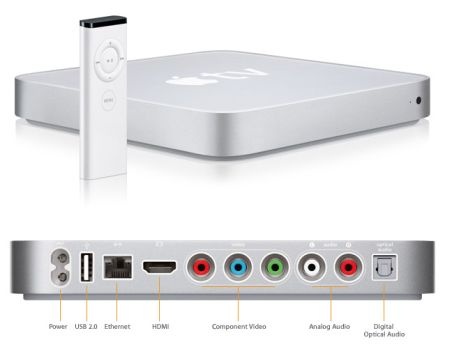
Apple TV Reportedly Becoming iOS-Based Next Month

Engadget reports that the Apple TV, which currently runs a modified version of Mac OS X 10.4 Tiger, will now run a new version of iOS when the device is refreshed next month.  The name of the home entertainment device would also change from "Apple TV" to 'iTV" to bring it in line with their other i-prefixed products.  Similar to existing iOS-based devices, the new iTV would be capable of running apps, and is rumored to start at a $99 price point.

While previous rumblings indicated the refreshed Apple TV would sport 1080p output, the newest reports suggest it will max out at 720p.  My initial reaction is that this is a bit of a letdown from a resolution standpoint.  Ideally they'd release an iTV at a $99 price point, and then an iTV Pro at $199/$299 with additional storage & 1080p output.  However, this likely doesn't fit with their "local storage is irrelevant" paradigm once iTunes moves to the cloud and all media is streamed.

I'm skeptical the A4 chip (currently used in the iPhone 4 & rumored to be in the new iTV) itself is completely incapable of driving 1080p video, since the 3GS could do so with the previous generation's hardware.  More likely, it didn't deliver consistently reliable 1080p playback.  Apple has a history of limiting its devices in such a manner, such as when they prevented the iPhone 3G from shooting video natively.

Perhaps the folks in the jailbreak community or at aTV Flash will be able enable 1080p playback unofficially, though.  (As an aside, anyone with a current generation Apple TV shouldn't think twice about purchasing aTV Flash to enhance their device.  It changed my usage of the Apple TV from an iTunes music extender, to a full-fledged media center solution.)

With the addition of the new iTV to Apple's lineup, it would bring the number of products running iOS to four:

- iPhone
- iPod Touch
- iPad
- iTV

The unveiling of this new device is expected to be on Tuesday, September 14.  A new version of iOS, likely 4.1, is also anticipated to be announced at the event.