Showing posts with label Software Saturday. Show all posts

Saturday, October 30, 2010

Software Saturday - Gas Cubby


This week's app selection is one I've been using for almost a year. Gas Cubby is a simple logging app that allows you to store information related to your automobile's maintenance & gas mileage.

I use it to keep tabs on the gas mileage in my car, and when my wife's car is due for an oil change. Each time you fill up with gas, you enter your odometer's mileage, the number of gallons you put in your car, and the price per gallon. Gas Cubby will calculate your gas mileage between fill ups based upon these inputs. Aside from the basic inputs, you can also record items such as gas brand, payment method, & type of gas.

Using the app is a helpful way of keeping track of gas prices in your area and can give you insight as to whether your car may need maintenance should you see your gas mileage average is dropping over time. It's also useful for budgeting purposes if you want to see exactly how much you're spending on fuel over a given period of time.

You can choose between a free ad-supported version or a paid ad-free version of Gas Cubby. Links to both versions are available at the developer's website below.

http://appcubby.com/gas/index.html

Saturday, October 16, 2010

Software Saturday - Due


While I use Remember The Milk for most of my task management needs, sometimes a full-blown reminder with a priority rating and due date/time is overkill.  Usually if I needed to remind myself to do something within a short period of time, I'd just use the iPhone's built-in Clock app.  Using the timer function in the Clock app was somewhat inconvenient, though, since you could only set one timer to run at a time, and if you frequently set timers of different lengths, you'd need to adjust the time wheel before each use.  Due addresses each of these shortcomings.

Within Due, I've created different timers for each of my frequently used short-term tasks.  Such tasks include when to switch my laundry or how long to keep the humidifier submerged in distilled water when I'm recharging my humidor.  Once you've configured your timers, you can enable each one by flipping the button shaped like a light switch.

Currently I'm only utilizing the Timers feature within Due, but the app also has a more traditional Reminders section, allowing you to remind yourself after a certain period of time.  My mind immediately leaps to using Remember The Milk if I'm going to enter a reminder, though, so I likely won't use Due's Reminders section much.  Unlike Remember The Milk, Due doesn't use a Push Notification server to deliver reminder alerts, so in the event you won't be in an area of data coverage, Due's reminders could represent a better solution.

You can read more about Due and find the download link at the developer's website.

http://www.dueapp.com/

Saturday, October 09, 2010

Software Saturday - Boxcar


Boxcar is the Swiss army knife of Push Notifications for the iPhone. By linking your Twitter account to Boxcar, anytime you receive an @-reply or Direct Message on Twitter, you'll receive a Push Notification on your iOS device.

This makes using Twitter on the go a lot easier, since you don't have to open your favorite Twitter app to see if someone has responded to you or mentioned you on the service.

When you receive a Push Notification via Boxcar and then slide to view, the app will launch and then immediately launch your mobile Twitter app so you can see and respond to the message. If you don't immediately slide to view your message, you'll have a badge on your Boxcar app icon when you come back to your device.

While I use Boxcar purely for Twitter Push Notifications, you can also link it to send Push Notifications for Facebook, Gmail, Growl, or RSS feeds.

Boxcar is a free download and sports an optimized interface for both the iPhone & iPad. You can find out more about Boxcar at the developer's website below.

Saturday, October 02, 2010

Software Saturday - reQall


I have a problem.  Inexplicably, the act of driving causes me to remember tasks I need to accomplish or things I want to research.  By the time I reach my destination, though, I frequently forget what that task or topic was, as my mind has moved on to thinking about other things.  This used to really bug me, until I found reQall.

The reQall iPhone app itself is practically a full-fledged task management solution.  However, I don't really use it that way.  When you sign up for a reQall account, you input your cell phone number.  You're then provided with a 1-888 number you can call from your linked phone number on the account, and input tasks via voice.  reQall will interpret your message, transcribe it to text form, and then e-mail you the content.

As you may have already realized, this is a great solution for capturing thoughts while you're driving.  I've programmed one of the speed dial buttons on my car's dash to reQall's 888 number.  It initiates the call to reQall's service, and within seconds I'm greeted with:

"Hello, reQall here. Do you want to Add, Share, or reQall?"

A typical response might be:

"Add."  Then I'll wait 2 to 3 seconds for the beep and say something like, "Take laundry to cleaners.  Friday. 8AM."

I'll finally hit the end call button my steering wheel, and I can forget about it.

By the time I reach my destination, I'll have an e-mail in my Gmail inbox from reQall with a subject line of "Take laundry to clearners. Friday 8:00am."

I've also setup a filter within Gmail that takes any task e-mail from reQall, and automatically forwards it to my Remember The Milk personalized e-mail address.  By doing so, the task is added to my Remember The Milk to do list, complete with the correct due date & time.

So by using a combination of reQall, Gmail, and Remember The Milk, I can effectively add tasks to my to do list, all by voice, and without ever taking my eyes off the road.  Technology is pretty cool.

To learn more about reQall and find the download link to the app, visit their website below.

http://www.reqall.com/

Saturday, September 25, 2010

Software Saturday - GV Mobile +


I've been using Google Voice as my primary phone number since March of 2009.  Shortly after switching over, I read an article about Sean Kovacs, an iPhone developer in Florida who was creating a native iPhone application for Google Voice.  After a few e-mails were exchanged, he agreed to let me be a beta tester for his app, GV Mobile.

It was a great solution, and I enjoyed using the app for about 4 months.  Sadly, towards the end of the summer in 2009, Google & Apple had a falling out of sorts, which ultimately ended in the removal of all Google Voice apps from the App Store (not to mention an FCC inquiry of both companies).

Fast forward a year to September 2010 and Apple announced they were relaxing their App Store approval policies, ultimately paving the way for the return of Google Voice apps to the iPhone platform.  Last weekend that finally happened, when Sean's new GV Mobile + was approved and went live on the App Store on Saturday evening.

For iPhone owners who also use Google Voice, GV Mobile + is currently the best solution.  Although Google released a fairly useful web interface for Google Voice earlier this year, GV Mobile + is a more elegant implementation since it benefits from running as a native app on the device.

So why would you need a Google Voice app?  Well, if you want your Google Voice number to show up as the caller ID when you place calls, you need to initiate that call via an app or the web interface.  If you don't, your "old" cell phone number will appear on your contact's phone, leading to the inevitable question, "Hey, didn't you tell me you changed your phone number?"  Another benefit is that you can see the transcripts of voicemails within GV Mobile +, making it unnecessary to actually listen to the audio version.  And perhaps most useful of all, you can send and receive SMS messages directly from the app, usurping the need for a text messaging plan from AT&T.

You can find out more info about the app and follow its continued development at his website below.

Saturday, September 18, 2010

Software Saturday - Apps I Use Every Single Day On My iPhone

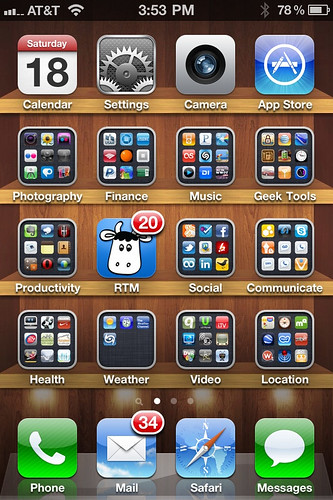
iPhone Homescreen September 2010

Inspired by this post Dwight Silverman wrote last week on TechBlog, I thought I'd showcase the iPhone apps I use every single day on my device.

The iPhone 4 ships with several apps already preinstalled.  These first-party apps cover basics like an e-mail client, web browser, calculator, camera, etc.  As I evaluated my daily usage, I find there are 8 first-party apps I use every single day.  They are Mail, Safari, Phone, Messages, Calendar, Camera, App Store, & Photos.

Currently I have 425 third-party apps in my iTunes Library.  Of those 425, I have 219 installed on my iPhone 4.  So what of those other 206 apps?  Well, some are iPad apps, others are iPhone apps I downloaded but decided I no longer needed on my actual device each day.  With 219 third-party apps installed on my phone, you'd think I'd use many of them every day, right?  Well, as I reflected on my actual usage, I found there were only 7 that I used each and every day.

Below I'm going to talk about those 7 apps, but I'm also going to list the apps that I find I use at least once a week, and those I use at least once a month.  The number of weekly use apps includes 11 more on the list, and the monthly use apps add 20 more.  As I did this review process, I was somewhat surprised that in any given month, there are only 38 of my installed 219 apps (17%) that I'll definitely use.  The remaining 181 apps are the "just in case" apps, or ones that I think could be useful if the correct situation comes up.

Daily Use Apps

Foursquare
Foursquare

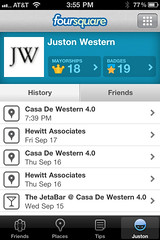
I caught the Foursquare bug just before I went to South By Southwest Interactive in Austin this past March.  Now I check in everywhere go.  App Store link here.

Gowalla
Gowalla

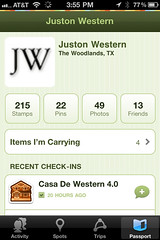
Like Foursquare, but with a better design.  I especially like Gowalla's Passport feature, where you get a stamp for each venue you visit.  This was the real reason I bought an international data plan when I traveled to Paris earlier this year: I wanted to keep track of all the places I visited in the city on my Gowalla passport.  App Store link here.

Twitter
Twitter

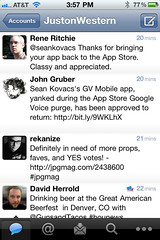
This is the app that evolved from the earlier Tweetie app.  This is how I post all of my status updates, which also get syndicated to Facebook via Friendfeed.  App Store link here.

Facebook

Facebook

Perhaps the killer app for the iPhone.  I've been a daily Facebook user since Cinco De Mayo 2004, and still love the service today.  My social graph on Facebook is almost double that of Twitter, too, so I still do most of information sharing & status reading via this app.  App Store link here.

Beejive IM
BeejiveIM

This instant messaging app has mostly replaced SMS for daily communication with my closest friends.  App Store link here.

Remember The Milk

Remember The Milk

An essential element in my productivity package, coupled with Gmail, Google Calendar, & Google Docs.  App Store link here.

Weightbot
Weightbot

I now have two years of daily weight entries entered in this app.  App Store link here.


So that shows you which apps truly get used every single day on my iPhone.  They're heavy on the social networking, location based services, and communication, but that kind of aligns with my interests.

Now as for the other apps which get launched on at least a weekly or monthly basis, I have a listing for each category below.


Weekly Apps

USAA
Gas Cubby
SplashID
Groceries
Speed Test
Flickr
Simplenote
Boxcar
Voice Central
Kindle
Sportacular

Monthly Apps

CameraBag
Chase
American Express
Bank of America
ING Direct
Square
Pandora
Shazam
Remote
WWOZ New Orleans Jazz
AT&T myWireless
AppBox Pro
iStat
reQall
LinkedIn
The Weather Channel
DVR Remote
Peggle
Wikiamo
SEC Mobile

Sunday, September 12, 2010

Software Saturday - Remember The Milk


This week's selection is one of the pillars in my personal time management system.  Remember The Milk is a task management service that initially began its life as a web-based solution in August 2004.  I became aware of it sometime early in 2008 thanks to posts on Lifehacker, but at the time I was content with keeping my to do list on a Google Spreadsheet.

During the summer of 2009 I began to explore alternatives for a task management system, as I felt I'd outgrown the spreadsheet method.  One of the requirements of my new system would be an iPhone compatible version so I could enter & be reminded of tasks on the go.  I experimented with OmniFocus & Things, but never got comfortable working in each of their OS X applications in tandem with their iOS portable apps.

What really sold me on Remember The Milk was its inclusion of Push Notifications on the iPhone and very tight integration with Gmail & Google Calendar on the web.  While I like to have access to my to do list on my iPhone, I tend to think of most of the tasks I want to put on the list while in front of my computer.  More precisely, I'm almost always staring at Google Calendar or Gmail when I think of that task that needs to be added to my list, since it's often driven by an upcoming event or an e-mail I receive.

In both Gmail & Google Calendar, you can add a Remember The Milk widget that will live in your sidebar.  Since I use Google Chrome as my primary browser on both my MacBook & PC desktop, I've also started utilizing ChromeMilk, a Remember The Milk extension for Chrome that gives you access to your do list right from the browser.

The iPhone app is great because you can set Push Notification reminders to alert you to take action on your task exactly when you need to be reminded.  This is an easy way to remind my future self to go to the grocery store as I'm walking out of the office, or to bring those clothes to the dry cleaner just before I leave the house in the morning.  While I might not be in front of my computer to be reminded of those tasks, my iPhone is always on me, so it takes care of reminding me of these various tasks while I'm in motion.  That's why I like it so much.

Until recently, the Remember The Milk iPhone app required a Pro Membership to the service which costs $25 a year.  Now you can use the iPhone app for free if you don't mind a reduced number of syncs you can do in a single day & a lack of Push Notifications.  I happily paid for the Pro membership, though, and find I'm getting my money's worth.  In fact, I like the service so much that I gave my brother a gift subscription to Remember The Milk as one of his Christmas presents last year.

You can sign up for an account & find links to the iOS apps at the link below.

Saturday, September 04, 2010

Software Saturday - Sportacular


This week's app selection is timely as it coincides with the start of college football season in the US.

Sportacular is the iOS app that I would've expected ESPN to develop. It's literally the best sports news app I've encountered on the platform over the past two years.  There are sections of the app for most major sports, each with scores, standings, and news.

What makes this app an indispensable part of my Fall is the way it utilizes Apple's Push Notification system.  In my household, we have a diverse set of teams we follow each weekend.  On Saturdays, we follow our alma maters of Tulane, Auburn, LSU, and Florida State.  On Sundays, we follow the New Orleans Saints and Houston Texans.  Keeping up with game start times and score changes is easy with the help of Sportacular, though.

For each of my favorite teams, I've configured Sportacular to send a variety of Push Notifications to my phone.  Three hours prior to kickoff of each game, I get a notification to remind me to get near a TV at home or at a sports bar.  At kickoff time, I get another push notification signaling the start of the game in case I forgot.  Each time there is a score change in the game, I get a score alert notification.  Finally, once the game is over, I get a final score notification.

If I'm actually able to watch the game on television, these alerts are less important.  However, this past Thursday night was an example where 3 of my teams (Tulane, the Saints, and the Texans) were all playing simultaneously and I wasn't able to watch any of them on television.  Since I had my iPhone with me, I was still able to casually keep up with the games.

You can find the App Store links and additional information about Sportacular at the link below.

Sunday, August 29, 2010

Software Saturday - Simplenote


Recently I began writing more frequently on my blog, to the tune of at least one post per day.  I write best when I can first outline the structure of my story, and the inspiration for that post might strike at any point throughout the day.  That frequently includes a time when I'm not in front my laptop, so I sought out an app for capturing and outlining my thoughts that could run across my iPhone, iPad, & MacBook Pro.  Simplenote was the app I ultimately chose.

What most attracted me to Simplenote was its automatic syncing between instances of the app. That meant if I typed a few notes on my Simplenote iPhone app, those notes automatically appeared on the web version, the iPad app, and the third-party OS X Simplenote desktop client, Notational Velocity.

The app is decidedly no-frills, so you won't find a rich text editing environment like Microsoft Word or even Google Docs.  Think of it more as a cloud-enabled version of the venerable Notepad.  The stripped-down nature of Simplenote was part of its appeal to me, though.  It does one thing and does it well, without other bells & whistles as potential distractions.

You can sign up for a Simplenote account and find links to the iPhone/iPad app at the address below.

Saturday, August 21, 2010

Software Saturday - BeejiveIM


When I used to carry an Air Force-issued BlackBerry circa 2005/2006, the Google Talk BlackBerry OS application served as a great replacement for my SMS needs.  Typically the people I texted with frequently were my wife & brother, and both were heavy Google Talk users.  Instead of sending SMS messages back and forth, they would just IM me via Google Talk.

Once I upgraded to a Palm Treo 700wx in late 2006, there wasn't a great mobile instant messaging application for Windows Mobile, so my mobile communication habits changed.  Unless the message was urgent, we would just e-mail each other.  If the message needed to be received quickly, we would SMS or place a voice call.

Upon moving to an iPhone in late 2008, I discovered another great mobile instant messaging application: BeejiveIM.  It wasn't quite as fast on my iPhone 3G as the original Google Talk application was on my BlackBerry, but it got the job done.  

After upgrading to an iPhone 4, though, BeejiveIM has become my go-to mobile communication app.  With the new phone's more powerful hardware, BeejiveIM is lightning fast and makes sending/receiving/managing IMs on the device painless.

I only keep my Google Talk account logged into the app, but it supports all of the major protocols such as Facebook Chat, AIM, MSN, & Yahoo.

Since I normally have my Google Talk account logged in via Adium on my MacBook Pro, too, it's not uncommon that an incoming message will be delivered simultaneously to BeejiveIM and Adium.   Based upon which device I respond from, subsequent incoming messages will only be delivered to that device for approximately the next 30 minutes.  I consider this to be a welcome feature, as I wouldn't want duplicate messages on each device once I begin a conversation, but want the option to decide which device to reply from during future conversations.

You can learn more about BeejiveIM & find purchase information at the link below.

Saturday, August 14, 2010

Software Saturday: Groceries


This week's selection is an app I use nearly every day.  Groceries, as the name implies, allows you to organize your grocery list on your iOS device.

Prior to purchasing this app, my wife & I usually kept a Post It notepad in our kitchen and would add items to it throughout the week as we'd run out of products around the house.  It was a decidedly low-tech solution, but mostly met our needs.  The problem arose when we wanted to add an item to the list when we weren't nearby, or when we decided to run to the grocery store but didn't have the list with us in the car.

Groceries addresses both of those issues.  Since I always have my phone with me, I can add items on the fly, regardless of my current location.  Further, if my wife decides she'll run to the store instead of me, I can e-mail the list from my phone to her phone.

The application comes preloaded with thousands of brands of items, ranging from Tabasco Green Pepper Sauce to Snuggle Original Scent dryer sheets.  If an item doesn't already exist in the app's database, you can add new ones as needed.  Items can be marked as favorites if you frequently purchase the same ones.  This allows you to quickly add those items to your new grocery list.  The products on your list are organized by the grocery store aisle most likely to contain the item.  I've found this really speeds up my shopping process since I'm not continuously scanning the entire list looking for which items might be in my current aisle.

Earlier this week, Groceries updated to a new version with support for the iPhone 4's high resolution Retina Display and fast app switching.  The design of the app was gorgeous before, but it really pops off the screen in the new version.

You can read more about the app and find the download link at the developer's website below: